All around the world, approximately 9 out of 10 home computers run a version Microsoft Windows. Windows allows you to surf the web, use various applications and change your computer’s settings. It allows us to do everything relatively easily. It’s very likely that it’s installed on your computer, so it is important to learn these 18 tricks that will save you time and make you feel like a computer wiz:

1. Quickly get to the relevant item on a scrollable list
Windows will sometimes give you a selection menu with many options, requiring you to scroll up or down until you find the correct option.
- To get to the relevant choice quickly, open up the list, and then click the letter in the keyboard that corresponds with the first letter of the choice.
- The selection bar will move to the first option with that letter, saving you the scrolling time (which can take a while).
Example: If you’re trying to change the language to Spanish like in the picture below, click “E” (Español). This trick also works in your desktop, and in a file folder.
 |
| An example for a multiple-option scroll menu |
2. Print only what you want
You find a great recipe, a funny joke, or an interesting article that you want to print, but you don’t want to print the whole page, just a specific part. What you do is:
- Use the mouse to highlight the text you want to print.
- Go to “File” and select “Print”, or use the Ctrl + P shortcut.
- In the relevant window, select “Print Selection” (see a similar version below).
 |
| The selection check boxes are highlighted in red for reference |
 |
| The selection check boxes are highlighted in red for reference |
3. Make the mouse pointer always stick to the dialog buttons
When Windows pops up a dialog box (error / selection / save), you can make the mouse pointer automatically appear on the box’s buttons.
- Click on Start (
).
- Go to: Settings > Control Panel
- Double-click the mouse icon.
- In the new window, go to the “Pointer Options” tab, and then check the box next to “Automatically move pointer to the default button in a dialog box”.
 |
| Relevant check box highlighted in red |
- 4. Create shortcuts to your favorite sites on your desktopIf you have a few websites that you love to visit often, why not make a shortcut that will launch your browser in the desired website?
- Find a site you want to bookmark (like www.blazefiery.blogspot.com)
- Make the browser window smaller by double clicking the top bar.
- See the small page icon that is suddenly visible by the address bar? Left-click it and drag it out of the browser window and onto your desktop.
- Whenever you launch that link, you’ll be taken to your favorite page automatically.

"Page" icon highlighted in red 5. Change the folder icon into a picture you wantAll the folders in your computer are a mess? Can’t always find what you want quickly because they all look alike? You can avoid that by assigning a picture to a relevant folder:- Get the image you want to use as the folder’s default image.
- Place it in the folder.
- Click the image once and let the name be highlighted in blue, click on the F2 key, then rename the file as “folder”.
Now your folder will have the image of your choice as the default image.
 |
| Changing the folder's name on the right, New folder image on the left |
6. Decide which programs will run on startup
When we turn on our computer, some applications launch along with it. Sometimes, these applications slow down the computer’s start-time, or they just might be unnecessary. To stop these applications from running on startup, do the following:
- Click on “Start” (
- Type “MSConfig” in the search bar, then hit the “Enter” key.
- In the new window, go to the “Startup” tab.
- You will see a list of all applications that start along with the computer with a small checkbox on the left.
- Uncheck the boxes you don’t want to start with your computer.
- Click “OK”.
Be sure you know what you’re disabling! If you’re not sure, research it on Google or ask a friend.
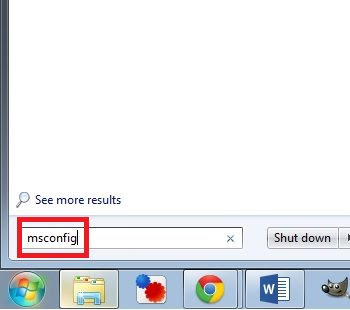 |  |
| Writing "msconfig" in the search-bar on the left, possible startup programs on the right | |
7. Get to the desktop quickly
If you have a lot of open windows, but you need to get to the desktop quickly, you can do it with a single action:
| |
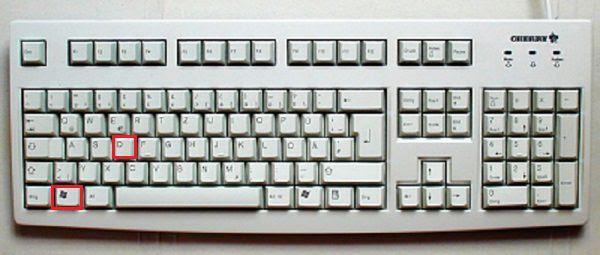 | |
| Keyboard with "win" & "D" keys highlighted | |
8. Get to a website without launching a web-browser
Need to save a few precious moments? You can get to a website of your choice without waiting for the web browser to load:
This will send you directly to that site.
| |
 | |
| Illustration of how to search for a website in the search bar | |
9. Rename many files in one go
If you have a big photo folder that you want to rename to a uniformname, along with a number, this is the way to do it:
Now all the files have a single name, followed by a serial number.
| |
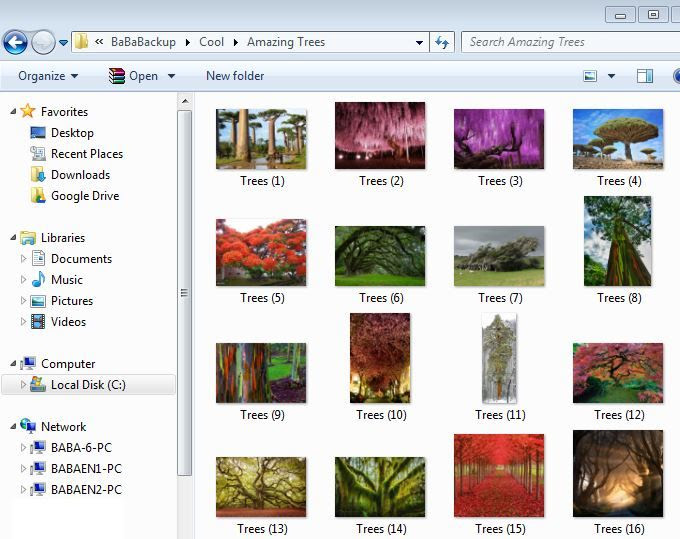 | |
| Selected files were named "Trees", number was added by Windows | |
10. Choose a default program to run certain files
Sometimes, when you install a new program, it “takes over” certain kinds of file, making a mess of your routine. There’s a quick and simple way to resolve that:
| |
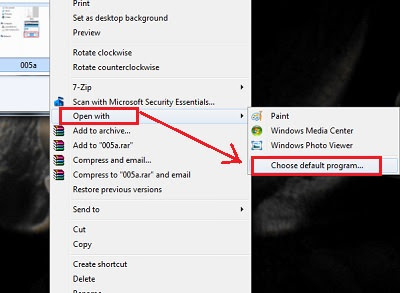 | |
| Red highlights showing relevant "Open" fields | |
11. Quick access to the “Help” menu
Simply click on the “F1” key – this will launch the help menu for the program you’re running.
| |
 | |
| A keyboard with the F1 key highlighted | |
12. Quickly access programs
If you want to find and run a program without having to look for it, use the built-in search feature in the Start menu.
| |
 | |
| An example of the results when searching for "Notes" | |
13. Use two programs, side by side
Windows allows you to run two programs, side by side, with ease:
| |
 | |
| A screenshot of 2 windows running side-by-side | |
Another method is to hold the “Win” key and use one of the arrow keys to send a window to the appropriate side.
| |
 | |
| Keyboard with "win" and arrow keys highlighted | |
14. Open a recently-used file (Windows 7 and above)
Want to see the last files/folders that were accessed on a certain program?
| |
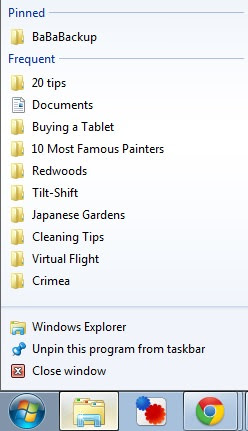 | |
| Example of recently accessed folders | |
15. Minimize all windows
There’s a “secret” button in Windows 7 and above that allows you to minimize all the windows at once.
| |
 | |
| The "secret" button is highlighted in red | |
16. Quickly access the calculator
If you need a calculator quickly, Windows has a solution for you:
| |
 | |
| Searching for "calc" and the relevant program | |
17. Delete whole words in a word processor
When you use the backspace key, you delete one character at a time, but you can delete whole words instead:
| |
 | |
| Backspace & Ctrl keys highlighted in red | |
18. Use an image preview window
A very useful function that Windows has is to show you a preview of pictures that helps if you’re trying to locate a specific one.
If you’re done, you should use the Alt + P combo again, as the preview window can be a hindrance when not wanting to preview pictures.
| |
 | |
| An example of what the preview tool looks like |